Introducing Cerquita
Time and task management are extremely personal. Do you follow the Getting Things Done philosophy? Use the Pomodoro Technique? Do you want to see everything coming up over the next week or month, or just focus on what needs doing right now? There are almost as many answers as there are people.
It’s no surprise, then, that there is a lot of software out there in this area, and each option does things a bit differently.
On macOS, I used to really enjoy a program called The Hit List. It was very keyboard-friendly, allowed me to see all my tasks and quickly prioritise them, and looked appealing and approachable. Unfortunately, it was last updated in 2018, and it has no support for modern Macs or macOS. So, a few years ago, I started looking for a replacement.
I ran through trials of at least half a dozen well-regarded to-do apps, and none of them really worked for me. Some were too complicated, focussing on complex project management; a few were too basic or lacked a feature I really wanted; most used their own databases that I first had to get my existing reminders into. So I settled on just using Apple’s built-in Reminders app, which has significant limitations but is available on my Macs and my phone and syncs reliably. But the itch never really went away, and in 2023 I started creating an app of my own.
The key features were clear from the start. I wanted to use the system reminders database rather than create something separate and add friction. I wanted the app to live in the menu bar so it was always readily available, and for most operations to be possible using only the keyboard.
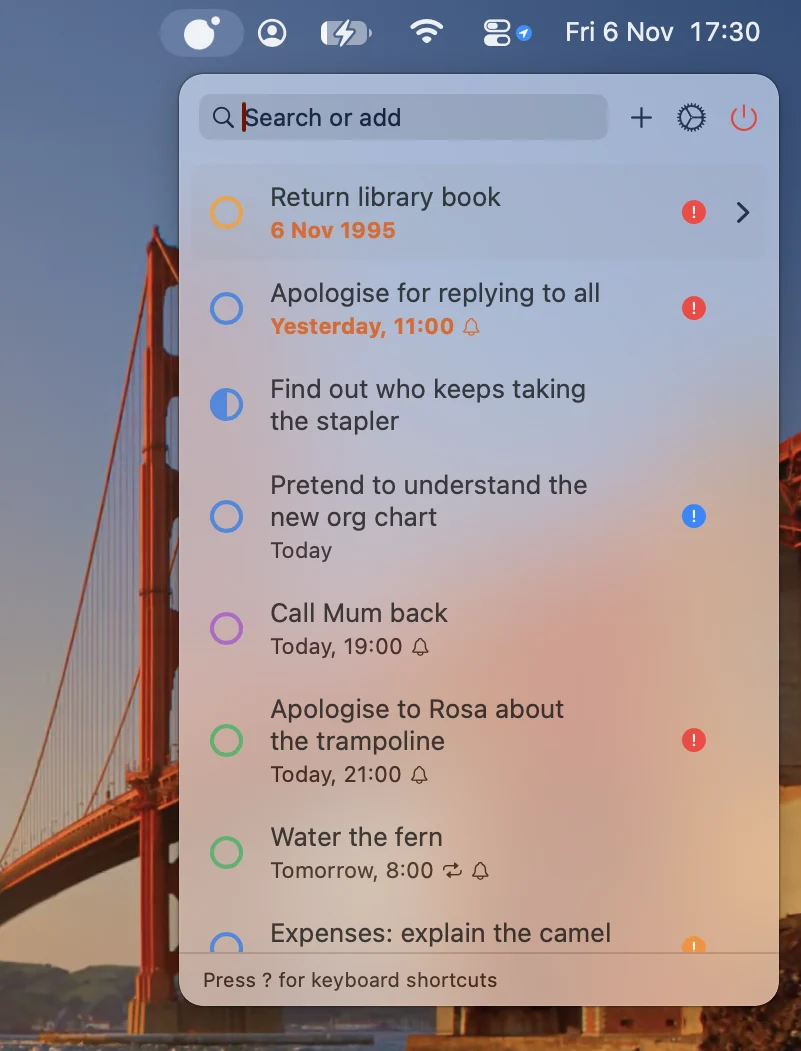
The app is now ready for release, and I’ve called it Cerquita, a diminutive of Spanish cerca, meaning close. Yes, it doesn’t obviously suggest to-dos or reminders, but did I mention that this is a crowded market? 😊 It’s now available on the Mac App Store for the price of a coffee. There is no subscription and there are no ads or in-app purchases.
Cerquita keeps your reminders nearby, in the persistent menu bar. You can open it with a keyboard shortcut, add a task, modify one or mark one as done without your hands leaving the keyboard, and get back to what you were doing. It has a unified “search or add” bar that helps you find what you’re looking for, or add it to your to-dos. You can choose which reminder lists are shown, and they keep the same colours as in Apple Reminders. There is lots of flexibility about the sorting order of the list, and items without a due date can be periodically boosted up the list for a day, so that you don’t forget all about them. Unlike in Apple Reminders, reminders can have a started (or planned start) date in addition to a due date. Syncing and notifications are handled by the operating system as usual.
Even though the app may appear quite simple and use system infrastructure, there are still thousands of lines of Swift code required to create the user interface and wrangle the data internally. I did use Claude Code to help with development, particularly working around various UI rendering quirks, and the app would probably not have reached a polished enough state to release without it. I’m glad it’s made it this far. If you use a Mac and depend on reminders like I do, I hope you’ll give it a look.